University of Bath
Research Computing Team (DDaT)
Anatra HPC Documentation
Logging onto the University Linux service
The cloud HPC service can only be accessed either on campus or from behind the University VPN. For details on accessing the VPN you can visit https://www.bath.ac.uk/guides/setting-up-vpn-on-your-device/.
An alternative is to go through the University linux service (which is what we shall do here - but if behind the VPN you can jump staight to logging onto the cloud HPC service).
Let's try logging on to the University linux service. (For a more in depth description visit our guide on how to login).
You can log-in to linux.bath.ac.uk with you University username and password using the following command from the terminal window:
ssh [userID]@linux.bath.ac.uk
Insert your University credentials and you should be greeted with the following log-in message:
This is a service for Staff and Students of the
University of Bath.

Disconnect NOW if you have not been expressly authorised
to use this system.

Unauthorised use is a criminal offence under the Computer
Misuse Act 1990.

Communications on or through the University of Bath
computer systems may be monitored or recorded to secure
effective system operation and for other lawful purposes.

 ________________________________________
(  _  _                      ®           )
( | |(_) _ __   _   _ __  __             )
( | || || '_ \ | | | |\ \/ /             )
( | || || | | || |_| | >  <              )
( |_||_||_| |_| \__,_|/_/\_\ .bath.ac.uk )
(                                        )
 ----------------------------------------

       ▓▓▓▓▓
 ▓▓▓ ▓▓▓▓▓▓▓▓▓ ▓▓▓  OS:     Ubuntu 18.04.6 LTS
 ▓ ▓░░░▓▓▓▓▓▓▓▓▓ ▓  Codename:   Bionic Beaver
  ▓░░░░░▓▓▓▓▓▓▓▓▓   Kernel: 4.15.0-166-generic
 ░░░██░░▓▓▓▓▓2 ▓▓▓  Hostname:   linux2.bath.ac.uk
 ░░░░░░▓▓▓▓▓▓▓▓▓▓▓  Cores:  4 @ 2.14 GHz
 ▓▓▓▓▓       ▓▓▓▓▓  CPU:    Intel(R) Xeon(R) E5-2660
  ▓▓▓▓▓▓   ▓▓▓▓▓▓   RAM:    16 GB
   ▓▓▓▓██║██▓▓▓▓    Users:  2
     ▓▓██║██▓▓
       ██║██


---------------------------------------------------------
Run the command software to see what is available
---------------------------------------------------------
Issues or requests goto - http://go.bath.ac.uk/helpform
---------------------------------------------------------
Linux® is the registered trademark of Linus Torvalds
---------------------------------------------------------
Last login: Fri Dec 10 12:33:23 2021 from 172.25.63.115

mjc62 in linux2 in ~
Logging onto the Anatra HPC service
Now we are on the University linux service (or behind the University's VPN) we can try logging onto the new Anatra HPC environment.
ssh [userID]@anatra.bath.ac.uk
You should be greeted with the Anatra login:
_                _
   / \   _ __   __ _| |_ _ __ __ _
  / _ \ | '_ \ / _` | __| '__/ _` |
 / ___ \| | | | (_| | |_| | | (_| |
/_/   \_\_| |_|\__,_|\__|_|  \__,_|

-------------------------------------------------------------------------------
Use the following commands to adjust your environment:

'module avail'            - show available modules
'module add <module>'     - adds a module to your environment for this session
'module initadd <module>' - configure module to be loaded at every login

-------------------------------------------------------------------------------

Last login: Sun Jan 23 15:50:37 2022 from 138.38.3.37

[bad45@loginnode1 ~]$
❯
To achieve the above in a single command, linux.bath.ac.uk can be invoked as a JumpHost:
ssh -J [userID]@linux.bath.ac.uk [userID]@anatra.bath.ac.uk
Congratulations! You're now logged in to Anatra!!
On Campus
It is possible to log onto the University linux service from a University PC with:
- ‘Start’ → All Programs → Xming → linux
This launches a program called ‘Kitty’ which will try to connect to the linux service. A window should open which asks for login as:. Insert your University username, and you will be prompted for a password:
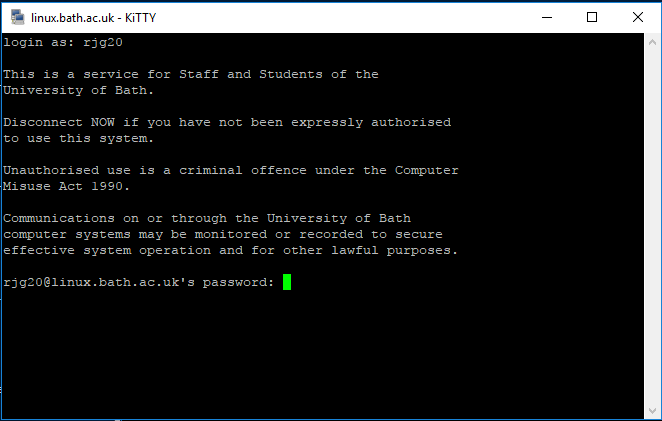
If you have successfully logged on, the window will display the same University Linux welcome message above.
The process for accessing Anatra from this session is the same as above.